 |
Radical Pie Equation Editor |
There are three types of aligners that can be used to align different parts of a multi-line expression group. Aligners can be inserted into an equation by selecting them from the upper-right entries of the spaces-ellipses-aligners palette, shown below. When turned on in the View menu, aligners appear as little red flags that indicate which of the three types they are.
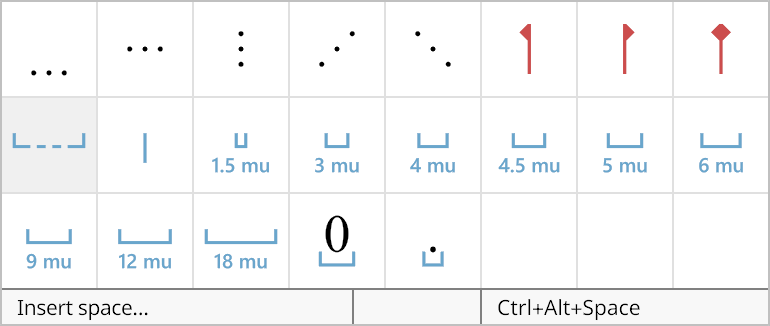
Any number of aligners of any type can be added to each line of an expression group. The i-th aligner on each line always matches up with the horizontal position of the i-th aligner on every other line. The line with the longest expression preceding the i-th aligner ultimately determines the positions of the i-th aligners on all of the lines. The horizontal layout of any expressions following an aligner begins at the aligner’s position.
An aligner can be a left aligner, right aligner, or center aligner, and the red flag points to the left, to the right, or in both directions, respectively. The type of an aligner determines how any expressions between the aligner and its preceding aligner, or the beginning of the line, are laid out horizontally. In the space that exists between aligners, the expressions are positioned left, right, or center as determined by the type of the aligner at the right end.
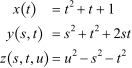
In the following example, center aligners were placed before each of the equals signs. This lines up the equals signs and causes the preceding expressions on each line to be centered in the maximum space required over all three lines. (This SVG file can be opened in Radical Pie.)