 |
Radical Pie Equation Editor |
The Font Manager is where you specify what fonts can be used in an equation and the ways in which they are applied for each style. The Font Manager dialog is shown below, and it is opened by selecting Font Manager... from the Settings menu.
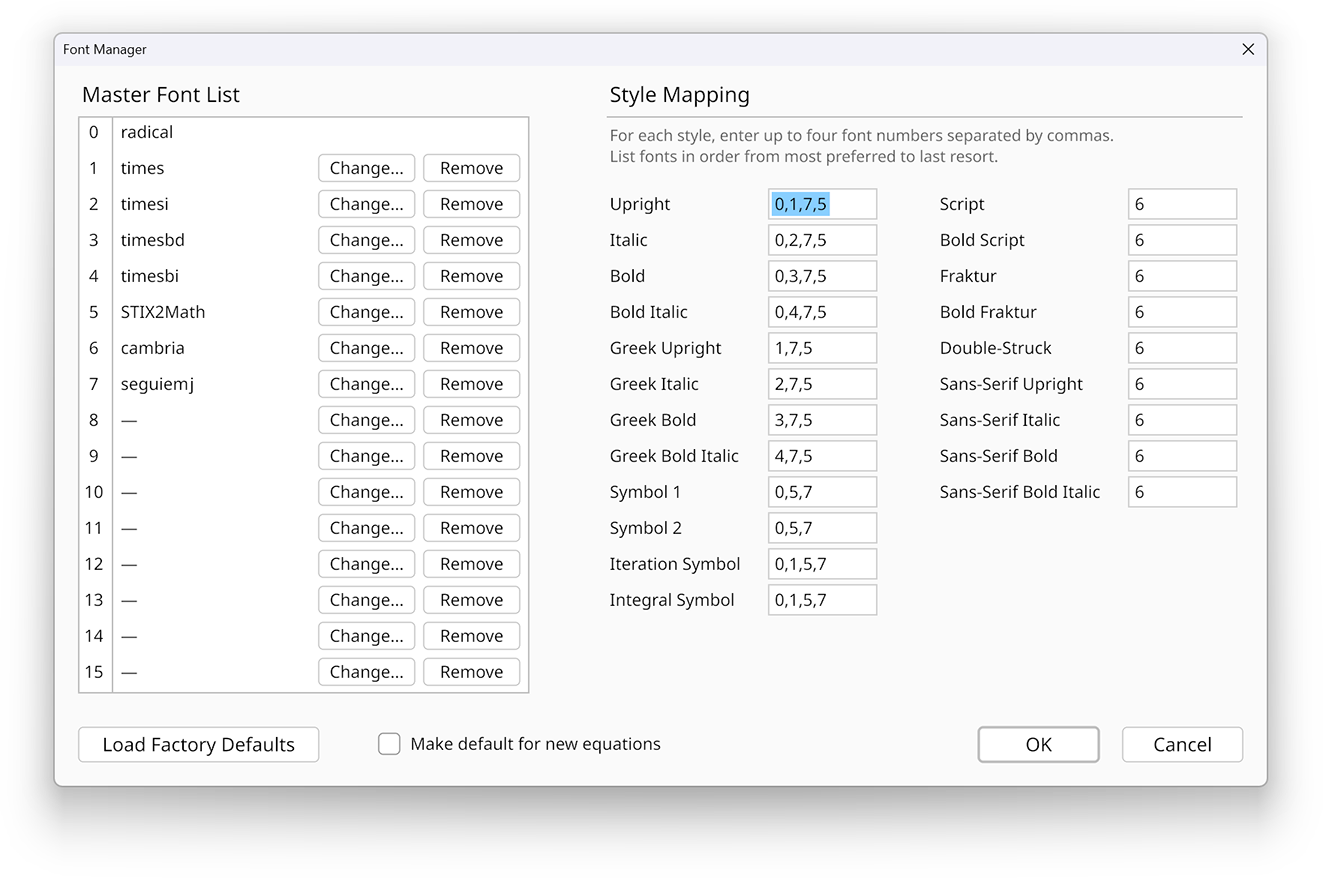
The Font Manager window displays a master list of fonts on the left and a table of character styles on the right. The master list of fonts contains every font that can be used in an equation regardless of how it’s actually used. There can be up to 16 fonts used at once, and every symbol in a single equation must use one of the 16 fonts in the list. The first font, which is numbered 0, is the built-in Radical font, and it is always available. (The Radical font contains hundreds of mathematical symbols, but not ordinary letters and numbers.) The other 15 fonts can be chosen by the user.
To change a font in the master font list, click the Change... button next to its entry. A dialog will appear showing all of the fonts installed on the computer for general use. Select the font you want, and hit the Okay button. If the font has not previously been used in any equation, then a small window will briefly appear as the font is being imported for the first time. The selected font will then appear in the master font list.
A font can be removed from the master font list by clicking the Remove button next to its entry. At this point, the numbered slot becomes empty. When the Okay button is clicked to close the Font Manager, any references in the style table to empty slots in the font list are ignored.
Each of the character styles that can be used in an equation are listed on the right side of the Font Manager dialog. These styles correspond to everything available under the Style menu plus separate upright and italic versions of the Greek style that receive special handling. There are additional entries for iterations and integrals that are automatically applied when an iteration or integral symbol is a character taken from a font.
In the box next to each style, you specify which font(s) you want to use to draw characters having that style. The fonts are identified by their entry numbers in the master font list, and there can be up to four fonts specified in a comma-separated list for each style. When Radical Pie needs to draw a character having a particular style, it looks for that character in the first font, and if it doesn’t find the character, then it looks in any remaining fonts in the order they’re specified. The first font listed for a style is thus the primary font from which characters of that style should be drawn, and any subsequent fonts are fallbacks.
If the Use separate styles for general text box at the top of the dialog is checked, then the mappings used for upright, italic, bold, and bold italic styles depend on the role of a symbol. If the role is anything other than General text, then the mappings are taken from the “Math” entries in the left column. Otherwise, if the role is General text, then the mappings are taken from the “Text” entries in the right column.
This feature allows the same mathematical font to be specified for all four of the upright, italic, bold, and bold italic styles when applied to symbols having mathematical roles while four separate, but possibly related, non-mathematical fonts are specified for the same styles when applied to general text.
Unicode defines encodings for several different mathematical typefaces in the range U+01D400 to U+01D7FF covering Roman letters, Greek letters, and numbers. The fonts that include these characters are generally known as “mathematical” fonts, and there are several such fonts in common use. The Cambria Math font is the mathematical font that ships with the Windows operating system, and it is the default font for styles like script, fraktur, and double-struck. The STIX Two Math Regular font ships with Radical Pie, and it also provides the various mathematical typefaces.
After fonts are imported for use in Radical Pie, they are stored in the RadicalPie subfolder of the local application data folder
for the current user. This folder can be accessed by entering %localappdata%/RadicalPie into the address bar in a Windows Explorer
window. Each of the files in this folder has the name of the font from which it was originally generated with the extension changed to .slug.
You can safely delete any of these files, and Radical Pie will re-import it if the font is later needed at the time an equation file is opened.
The font database, which contains a list of all font files installed on the computer and the names of the fonts they contain, is also stored in the local application data folder. It is named fonts.pie. If this file is damaged or deleted, then it will be rebuilt the next time Radical Pie starts up.